Create HTML and XML Sitemaps for Joomla with Xmap
Xmap is a sitemap generator component for Joomla CMS that helps website owners create organized site maps from menu structures, improve user navigation, and generate XML sitemap files for Google, Bing, and other search engines.
Built for Joomla Site Structure
Xmap creates sitemaps based on the menus already inside your Joomla website, making it easier to organize pages, publish XML feeds, and help crawlers understand your content.
- Create multiple sitemaps with different configurations.
- Generate HTML sitemaps for visitors.
- Generate XML sitemaps for search engine robots.
- Control which menus are included and how they appear.
- Support a growing range of Joomla components.
Xmap keeps the original purpose of the site clear: fast sitemap creation, flexible menu-based configuration, and support for both visitors and search engine crawlers.
Easy to Use
Get your site map generated with just a few clicks. Add a title, choose the Joomla menus you want included, and let Xmap build the structure for you.
Popular Since 2008
Xmap has been known as a popular Joomla site map generator since it launched in 2008, serving site owners who need a straightforward sitemap solution.
Fully Customizable
Create any number of site maps with different options, menu selections, and configurations so each sitemap can support a specific navigation or SEO goal.
Xmap is a powerful site map generator for Joomla CMS. It creates a map of your site using the structure of your Joomla menus.
For visitors, Xmap can generate a clean HTML sitemap that helps people browse important pages, categories, and sections of a Joomla website. For search engines, it can generate an XML sitemap designed for Google, Bing, and other spiders or robots that rely on structured URL discovery.
Xmap creates the site map based on the menus of your site. You can add as many menus as you want to the sitemap and arrange them as you like. You can also create multiple sitemaps with different options for each, which makes the component useful for larger Joomla websites, multi-section sites, and projects with different content types.
Xmap supports a large number of components, and that number has continued to grow through community usage, extensions, and development contributions.
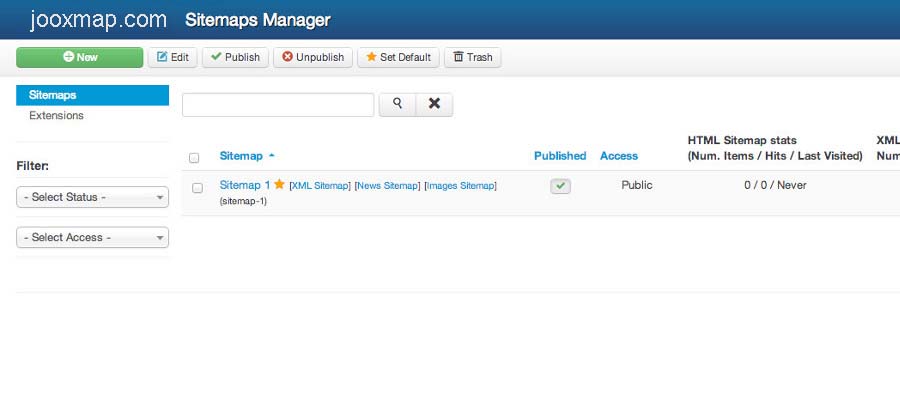
A sitemap is not just a technical file. It is a crawl path, a navigation aid, and a signal that helps organize the relationship between important pages.
XML Sitemaps for Search Engines
An XML sitemap gives search engines a structured list of URLs to crawl. For Joomla websites with nested menus, older articles, component pages, or changing content, XML sitemaps can help Google and Bing discover important URLs more efficiently.
Xmap helps generate XML sitemap output from your Joomla menu structure, giving site owners a practical way to support indexing without manually building sitemap files.
Learn about XML sitemap setupHTML Sitemaps for Users
An HTML sitemap helps visitors find pages that may not be obvious from the top navigation. It can also support internal linking by giving important pages an accessible path from a single sitemap page.
Because Xmap builds from Joomla menus, the HTML sitemap can reflect the actual structure of the website while still giving administrators control over what appears.
Create a new site map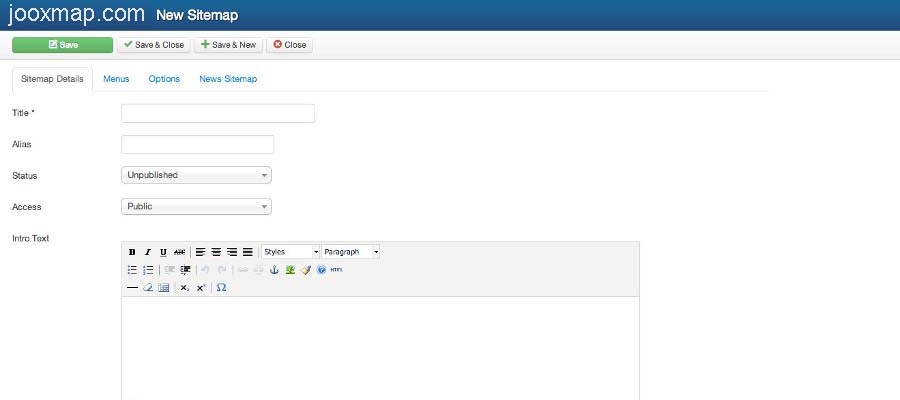
Xmap uses the menu structure already inside Joomla, so setup stays familiar for administrators and site owners.
Install the Xmap Component
Download and install Xmap through the Joomla extension manager, then review the installation documentation for setup details.
Select Joomla Menus
Choose the menus you want included in the sitemap. Xmap can include multiple menus and arrange them according to your sitemap needs.
Configure Sitemap Options
Create one sitemap or multiple sitemaps with different settings, depending on whether you need visitor navigation, XML submission, or section-specific maps.
Publish and Submit
Use your HTML sitemap for visitors and your XML sitemap for search engines such as Google and Bing.
Use these core pages to install Xmap, understand how the component works, create sitemaps, and configure XML sitemap output.
These planned guide pages can expand JooxMap into a stronger Joomla sitemap and technical SEO resource while keeping every page within 2–3 clicks from the homepage.
Joomla Sitemap Generator
A dedicated guide explaining how sitemap generators help Joomla websites organize URLs, improve crawl paths, and support indexing.
Joomla XML Sitemap Guide
A page focused on XML sitemap creation, search engine submission, crawler discovery, and common sitemap configuration practices.
Joomla HTML Sitemap Guide
A guide explaining how HTML sitemaps support user navigation, internal linking, and discoverability across Joomla websites.
Search Console Setup
A practical resource for submitting Joomla XML sitemaps to Google Search Console and monitoring indexing status.
Sitemap Troubleshooting
A support-style page for sitemap errors, missing URLs, menu configuration problems, and search engine submission issues.
Joomla SEO Best Practices
A topical authority page covering sitemaps, internal links, page structure, crawlability, and technical SEO basics for Joomla.
The original site included user feedback from Joomla extension users. These testimonials are preserved as trust signals on the updated homepage.
“It creates my sitemap in matter of seconds. Wow. No flaws or errors.”
Sine60JED User
“My last several sites have relied upon Xmap to get Google indexing working quickly and properly. It does the right thing immediately after installing and publishing, with no maintenance required.”
rphairJED User
“I've tried various different sitemap extensions but in the recent years none have matched up. Thanks and well done!”
abemediaJED User
“A must have for submitting a site map to the Google Search Engine. Thanks to XMAP for this great extension!”
RinehartEnterprisesJED User
“Very good and useful extension. It works perfectly and it is easy to install and setup. Great for search engine optimization.”
BIGsitesIndependent User
“Simple and robust tools like this are exactly what Joomla site owners need when managing sitemaps and search visibility.”
Joomla Site OwnerCommunity Feedback
Quick answers for site owners evaluating Xmap as a Joomla sitemap generator.
What does Xmap do?
Xmap creates site maps for Joomla CMS websites using the structure of Joomla menus. It can generate HTML sitemaps for visitors and XML sitemaps for search engines.
Can Xmap create more than one sitemap?
Yes. Xmap allows administrators to create multiple sitemaps with different configurations, menu selections, and options.
Does Xmap support XML sitemaps?
Yes. Xmap can generate XML sitemap output for search engines such as Google and Bing.
How does Xmap choose which pages to include?
Xmap builds sitemaps from the Joomla menus selected by the administrator. This allows the sitemap to follow the structure of the site.
Where can I download Xmap?
You can download Xmap from the downloads page and review setup information in the documentation section.
Download Xmap, review the documentation, and create HTML and XML sitemaps that help users and search engines understand your Joomla website.